
Use cases Recording and transcripts
The meeting ends. The notes are already done
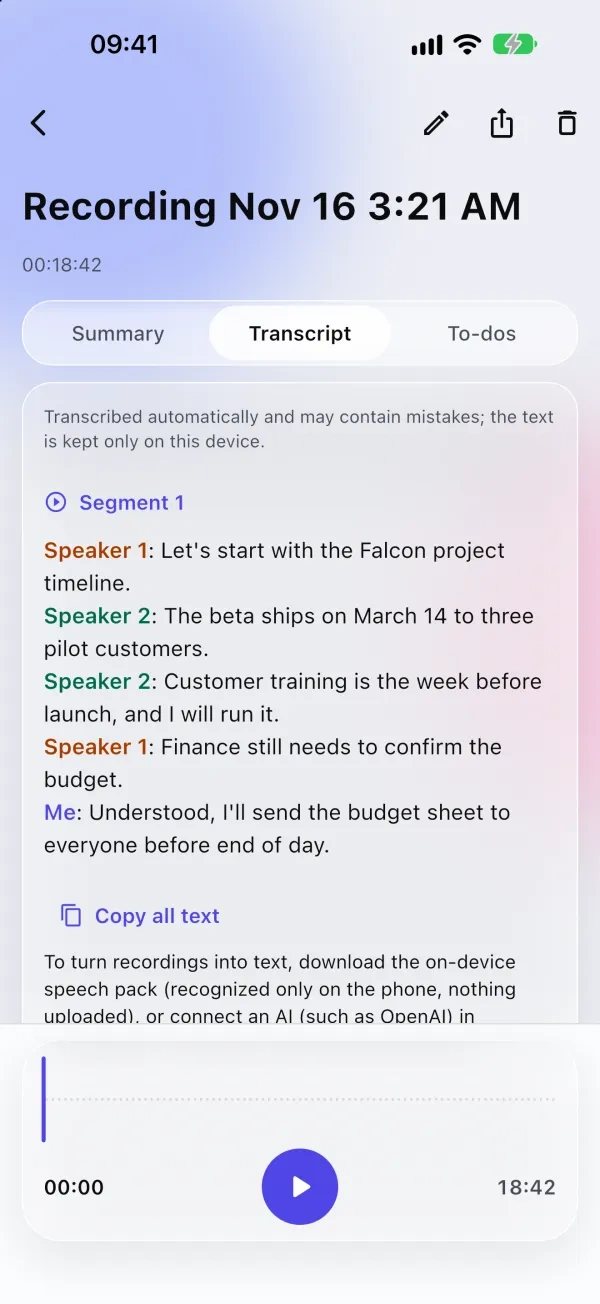
Start recording and get on with the meeting. Afterwards the transcript is split by speaker, with the summary and to-dos on their own tabs, ready to copy or share.

-
Summary, transcript, to-dos
Three views of one recording, a tap apart.
-
Transcribe offline
Download the on-device speech pack (about 200 MB) and recognition runs on your phone, with nothing uploaded.
Frequently asked questions
Where are recordings stored?
On your device by default. You choose when to export or share them.
More ways to use it
- Travel and businessTalk with clients, front desks and drivers. See their words in your language, with a suggested reply.
- Multilingual meetingsWhen they ask, get an answer from your own files, with the source shown.
- TeleprompterFollows your voice, and can whisper the next line into your earphone.
- AI speaking practiceNo teacher to practise with? Speak every day anyway.
- Team training and examsQuestions from your company material, exams on the phone, compliance at a glance.